
If you’re having trouble signing in, follow the instructions below to create or reset your password and access your account.
If you are creating an account or logging in for the first time, follow these steps:
- Visit wict.org and click the LOG IN button in the upper right corner of the screen.
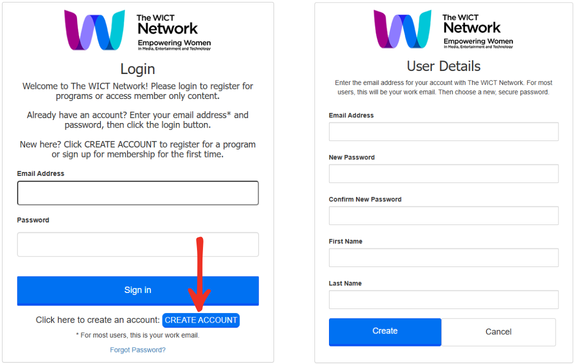
- On the login page, click the blue “Create Account” button, as shown in the image below. This will take you to the User Details page.
- On the User Details page, enter the email address associated with your wict.org account (for most users, this will be your work email address).
- Choose a new, secure password, enter your name, and then click “Create.”
If you need to reset your password, follow these steps:
- Visit wict.org and click the LOG IN button in the upper right corner of the screen.
- Click “Forgot Password.”
- Enter your email address to receive a verification code, then click “Send Verification Code.”
- Check your email for the verification code. Enter the code in the corresponding field and click “Verify Code.”
- Important: Do not click “Continue” before verifying the code. If you click “Continue” without selecting “Verify Code,” the process will not work.
Once your code has been verified, you will be able to reset your password and log in to your account.
If you have any questions or concerns, please contact The WICT Network Membership Team at membership@wict.org or 1-202-827-4794.
Page updated: February 2026